A Motion App is a custom React app beside a live voice agent. The agent drives it while it talks: a system grows, money flows, a chart shifts. Learners tap it or answer out loud, and the agent follows up.
73 Motion Apps already run in our own courses, from system design to sales.
a real coach call
PM Interview Prep · Product Lab
the coach drives it, you tap it
73 Motion Apps and counting
Labs built for our own courses: system design, statistics, estimation, consulting cases, forward deployed engineering, finance, accents, public speaking and sales. Each one runs beside a voice coach on a live call.
Product Lab · pick the first cut
Arch Lab · a cache under load
Estimation Lab · which stage chokes
Stats Lab · regression in 3D
Case Room · a live exhibit
Deploy Lab · read a trace
Product Lab · pick the first cut
Arch Lab · a cache under load
Estimation Lab · which stage chokes
Stats Lab · regression in 3D
Case Room · a live exhibit
Deploy Lab · read a trace
Product Lab · pick the first cut
Arch Lab · a cache under load
Estimation Lab · which stage chokes
Stats Lab · regression in 3D
Case Room · a live exhibit
Deploy Lab · read a trace
Product Lab · pick the first cut
Arch Lab · a cache under load
Estimation Lab · which stage chokes
Stats Lab · regression in 3D
Case Room · a live exhibit
Deploy Lab · read a trace
Stats Lab · the power curve
Arch Lab · a hashing ring
Product Lab · does the drop add up?
Deploy Lab · the ship bar
Case Room · your own numbers
Case lessons · the Doodle board
Stats Lab · the power curve
Arch Lab · a hashing ring
Product Lab · does the drop add up?
Deploy Lab · the ship bar
Case Room · your own numbers
Case lessons · the Doodle board
Stats Lab · the power curve
Arch Lab · a hashing ring
Product Lab · does the drop add up?
Deploy Lab · the ship bar
Case Room · your own numbers
Case lessons · the Doodle board
Stats Lab · the power curve
Arch Lab · a hashing ring
Product Lab · does the drop add up?
Deploy Lab · the ship bar
Case Room · your own numbers
Case lessons · the Doodle board
The loop behind every Motion App
Every good teacher has a board. A voice agent that only talks loses people the way a lecture with no board does. A Motion App gives the agent a board that moves, and lets the learner answer on it.
1
The agent talks
The coach explains, asks and pushes back by voice, the same as any Tough Tongue AI agent on the web, the phone or a meeting.
the coach asks Estimation Lab
the question lands on the board
2
The app moves
While it talks, the agent rewrites the app's data and the app redraws: a system grows, money flows, a chart shifts. The motion is the lesson.
the system moves Arch Lab
the cache empties, the database floods
3
The learner taps
Every question works both ways. Tap an answer on the app, drag a part, or just say it out loud.
you predict Stats Lab
tap a guess before the curve moves
4
The agent knows
The app tells the agent what was tapped, so it follows up on your choice instead of reading a script.
the coach follows up Product Lab
“You pick platform. Say why.”
Build one from a single prompt
No front-end work. Connect Tough Tongue AI to the assistant you already use and describe the app. It writes a real React and TypeScript app that you own, and attaches it to your agent.
1
Connect Tough Tongue AI to Claude or ChatGPT
Add the MCP server once. In Claude Code, Codex or Cursor, one command installs it with the build skill.
2
Ask for three ideas before any code
What is on screen at the start, what moves when the agent speaks, what the learner taps, how it ends. Pick one.
3
Tell it five things
Your design system, how things move, the sounds, where 3D helps, and what the agent does when the learner taps.
4
Test it on a call
It writes the app, attaches it to your agent and hands you a link. Talk through a lesson and watch the board follow.
Let's build the 3D architecture board for my system design mock. As the candidate names a part (load balancer, app servers, cache, database, queue), the agent adds it to the board and it drops into place. Dots flow from the users through the system to show traffic.
Sound: a click when a part lands, a low tone when something breaks. On a phone or without 3D, show a flat version. Save it to my workspace as an app named scale-it and give me the preview link.
scale-it/
README.md the agent's manual
src/App.tsx your React app
package.json
data/board.jsonwhat the agent rewrites
# in Claude Code, Codex or Cursor
npx plugins add tough-tongue/toughtongue-skills
The agent never touches your code during a call. It rewrites one small data file and the app redraws, so the app cannot break mid-call. Expect 20 to 30 minutes for a full app with a large model.
Ship it where your learners already are
Attach the app to a scenario and it goes wherever the agent goes.
Embed the agent on your website, white label included
Share a link that runs in the browser, nothing to install
Send the agent into Google Meet or Zoom, where the app shows as a screen share
Group scenarios into a course, with a scored report after every session
one agent, four places
Not only for tutors: sales teams use them too
The same loop works for sales practice and for live AI sales calls. These four run beside our sales roleplays.
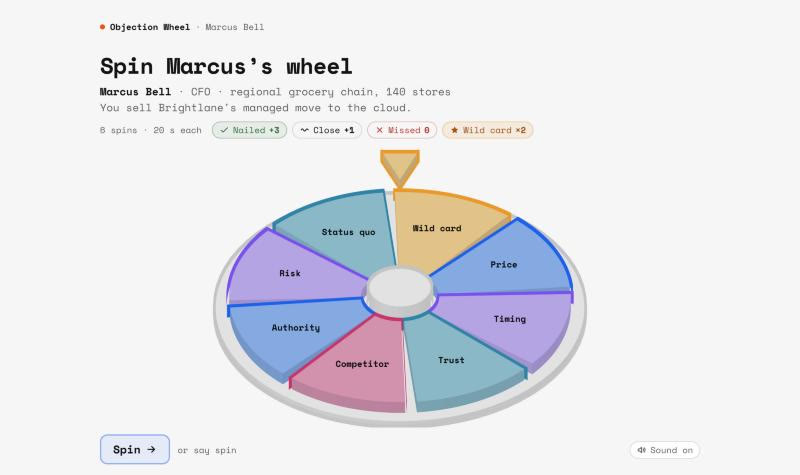
Objection Wheel, with Marcus, a grocery-chain CFO
Objection Wheel
The wheel lands on an objection type. The rep answers out loud in 20 seconds, and the buyer calls it.
Hold the Line
A price negotiation beside a 3D balance scale: every give and every get is a weight. Never give without a get.
Discovery Dig
Every good question uncovers a buried fact, layer by layer, down to the real reason to buy.
Call Coach
A live board beside a sales roleplay: the stage of the call, each move the rep lands, and the next move.
Motion Apps in 2 minutes
Objection Catch, a sales roleplay game, plus a Merger Lab, a Stats Lab and an Architecture Lab.
The free course
Four short lessons, from the idea to a deployed agent, with every prompt from the videos.
A Motion App is a small custom app that sits beside a live call with a Tough Tongue AI voice agent. The agent changes it while it talks, and the person on the call can tap it, which the agent hears about. Coaches use them as a board: a system design coach grows a system as you talk, a finance coach shows where the money goes.
How is this different from ChatGPT Canvas or Claude Artifacts?
Canvas and Artifacts are documents you read in a chat. A Motion App is attached to a live voice agent: the agent drives it during the conversation, hears what you tap, and the whole thing runs on your website, in a shared link, or in Google Meet and Zoom.
Do I need to write code?
No. Describe the app in one prompt in Claude or ChatGPT with the Tough Tongue AI MCP connected, or build it in the editor. The result is a real React and TypeScript app, so you or your developers can edit the code if you want to.
What is a Motion App made of?
A README the agent reads as its manual, a React 18 and TypeScript app bundled in the browser (it can use any npm package at an exact version), and small JSON data files. During a call the agent rewrites only the data files, never the code, so the app does not break mid-call.
Where can people use it?
Anywhere the agent runs: embedded on your website (white label works), through a shared link in the browser, or in Google Meet and Zoom, where the agent shows the app as a screen share.
Is it only for tutors and courses?
No. Sales teams use Motion Apps for objection practice, price negotiation and discovery calls, and the same apps can sit beside AI sales calls and demos.
Who can see my Motion App?
Apps are private by default. In an organization every member can see them. Anyone who can open the scenario an app is attached to can run it during their session.
How much does it cost?
The course that teaches Motion Apps is free. New accounts get 25 free minutes to try an agent, and Starter is $20 a month. See the pricing page for usage on phone calls and meetings.
Give your agent a stage
Pick one lesson you teach or one call you sell. Write down what should move when the agent talks, and what the learner should tap. That is your first Motion App.